For homes
Home Energy You Can Actually See: Solar, Battery, and the Bill
Your utility bill arrives about a month late and tells you essentially one thing: a number, and that the number is bigger than you hoped. It will not tell you that the pool pump ran at 4pm on the hottest days, that a well pump has started cycling more than it used to, or that your solar sent power to the grid all afternoon while you charged the car at midnight. All of that is knowable, most of it is free to read, and seeing it changes what people do.
This page covers what solar and battery systems will actually tell a third party in 2026, what it costs to see consumption at the circuit level, and the three things people reliably change once the house stops being a black box. We build home consoles, so we have a side here; the numbers below are dated and sourced, and the honest limits are called out as limits.
Three layers of "seeing it"
Home energy visibility comes in three layers, and they are independent. You can have any one without the others, and each answers a different question.
Generation and storage: how much am I making, and what is in the battery? If you have solar, this is usually the easiest layer to get, and often free.
Whole-home consumption: how much is the house pulling right now? One number, live, which is more useful than it sounds because it makes everything else visible by contrast.
Per-circuit consumption: which things are pulling it? This is the layer that changes behavior, and the only one that usually needs hardware added inside the electrical panel.
Layer one: what your solar will actually tell you
If panels are already on the roof, the data is usually readable without a subscription. As of July 2026:
SolarEdge gives the site owner a free monitoring API key generated from their own portal, with production and consumption at fifteen-minute granularity, at a few hundred requests a day. Many of their inverters also speak Modbus over your local network, which is even better because it does not depend on their cloud at all.
Enphase has a free developer tier (about a thousand requests a month, paid tiers above that), and separately the local Envoy gateway can be read on your own network using a token the owner generates. Per-panel production is visible, which is genuinely useful for spotting one underperforming module.
Tesla Powerwall exposes a local read-only interface: state of charge and power flows, yes. Changing modes or reserve settings, no, that went to the cloud API, and the Powerwall 3 is more restricted than the 2.
Sol-Ark speaks Modbus locally, which is what our own house runs on, so this one we can vouch for from daily use rather than documentation.
The honest limit across all four: you can read almost everything and control almost nothing. Anyone promising you app control of your inverter should be asked exactly which setting they mean. Monitoring is the real, reliable, valuable thing.
Layer two and three: consumption, and the panel problem
Consumption monitoring means current transformers, small clamps that go around wires inside your electrical panel. That is the catch: the panel is an electrician's territory, not a homeowner's afternoon project, and it is the one part of an otherwise plug-in system that involves a licensed trade. Budget a short electrician visit for it, or skip this layer and live with the generation data.
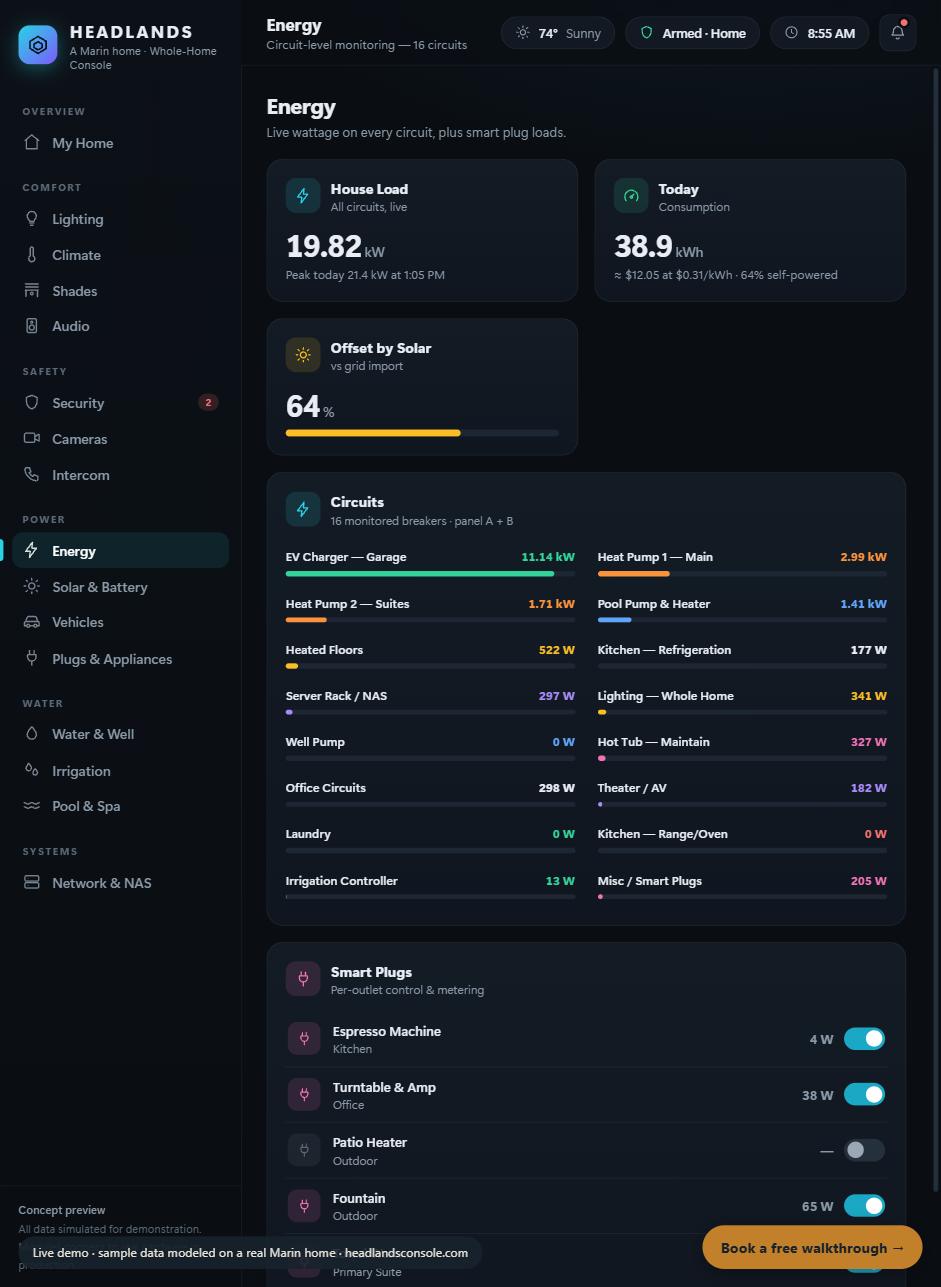
Per-circuit monitoring: every breaker, live. The EV charger at 11 kW next to a 522 W floor loop is the kind of comparison that changes habits. (Our interactive demo, sample data.)
For the hardware itself, two options are worth knowing and one is worth avoiding:
Emporia Vue 3 runs about $100 for whole-home and roughly $150 to $200 for eight or sixteen circuits (their store, July 2026). It has no official API and the company says none is planned, but it is an ESP32 device and the community firmware route gives you completely local per-circuit data. Best value per circuit by a wide margin, with the caveat that you are relying on a community path rather than a vendor promise.
IoTaWatt runs around $200 and up with clamps, is fully local with open firmware and a documented local interface, and needs no cloud at all. The purist option. Note that the original maker exited retail and it is now produced by a single successor, so supply is thinner than it was.
Sense, around $300, we do not recommend for this purpose. Its selling point is machine-learning device detection, which is guesswork compared to an actual clamp on an actual circuit, and it has no official API. You pay more for less usable data.
What people actually change
This is the part worth the money, and it is consistent enough to predict. Three things happen once a household can see its own power.
They move the big loads. Almost every large draw in a house is time-flexible: the EV, the pool pump, the dryer, the hot tub's heating cycle. Almost none of them need to run at 5pm. Californians on time-of-use rate plans pay meaningfully more during late-afternoon and evening peak windows than off-peak, which means the same kilowatt-hour costs different amounts depending purely on when you use it. Shifting a pool pump to the middle of the day, when solar is producing, is close to free power instead of the most expensive kind. You cannot make that decision without seeing the shape of your own day.
They find the thing that should not be running. Every house we have monitored has one: a circuit drawing power at 3am that nobody can explain. A pump cycling on a stuck float. A heater in an outbuilding. Resistance heat quietly running because a setting got changed a year ago. Per-circuit monitoring finds these in a week; a monthly bill never will.
They stop guessing about solar. "Did we get a good day?" becomes a number instead of a feeling, and "should we add a battery?" becomes answerable, because you can see how much you actually export versus how much you draw after sunset. That question is worth thousands of dollars to get right, and most people answer it from a salesperson's estimate.
Where the bill fits
We are deliberately not printing rate numbers here, because California residential rates change and a stale number in an article is worse than no number. What is structurally true and worth understanding: if you are on a time-of-use plan, your usage has a price that varies by hour, so when matters as much as how much. A monitoring setup pays for itself through load shifting and caught faults rather than through any magic reduction in consumption. Check your own plan and its peak window on your utility's site, then look at your own load curve. The gap between the two is the opportunity.
Where we fit (briefly)
Headlands builds home consoles you own, and energy is one of the systems that lands on the screen: solar and battery read live from your existing inverter, whole-home and per-circuit consumption if you want the panel work done, and water alongside it, because leaks and pump faults show up in both. Our own Marin home runs this way today on a Sol-Ark inverter and a Flume water meter. Home consoles start at $2,500 flat, the care plan is optional at $99 a month, and everything keeps working if you cancel, because it is yours. We also just do the hourly work if you would rather hire an engineer for an afternoon.
Everything you run. One screen.
Sources and dates: SolarEdge owner-generated monitoring API and local Modbus, Enphase developer tiers and local Envoy access, Tesla Powerwall local read-only gateway, and Sol-Ark local Modbus all confirmed July 2026 against vendor documentation. Emporia Vue 3 pricing per their store and the no-official-API statement per their help center, July 2026; the local-data path is community firmware, not a vendor feature. IoTaWatt pricing and successor-manufacturer status per its community, July 2026. Hardware prices are July 2026 and drift, so confirm before buying. Current transformers install inside an electrical panel and that work belongs to a licensed electrician; we design and integrate, we do not do line voltage. Time-of-use pricing structure is described generally on purpose; check your own utility's current rate plan. The energy screenshot is our interactive demo with sample data; the real house runs the systems described. This article is educational and useful, we hope, even if you never hire anyone.